
FINPACK International Download
Install or Reinstall FINPACK (International) on a desktop or laptop
This is the most common option for first-time installations. This is also the suggested installation for most deployments through Citrix.
Step 1: Click button to download installation file
Download FPSetup.exe
Step 2: Install and register FINPACK
Depending on your browser, click Run (in Microsoft Edge), FPSetup.exe (in Chrome), or Save File (in Firefox).
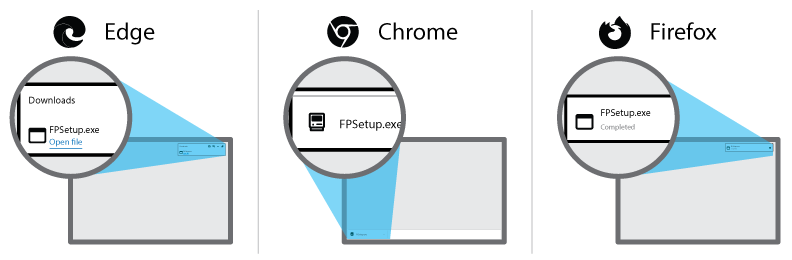
You may be prompted to run an unknown application. Click Yes to proceed.
Install or Reinstall FINPACK (International) on a Network file server
This is the installation for deploying FINPACK on a network file server. Most Citrix installations use the desktop installation rather than this network file server installation.
Step 1: Click button to download network install file
Download FPNetwork.exe
Step 2: Install and activate FINPACK
Depending on your browser, click Run (in Microsoft Edge), FPNetwork.exe (in Chrome), or Save File (in Firefox).

You may be prompted to run an unknown application. Click Yes to proceed.